You are using an out of date browser. It may not display this or other websites correctly.
You should upgrade or use an alternative browser.
You should upgrade or use an alternative browser.
SIM [KISS] Custom Order Maid 3D2 + Modpack R4.10 [JAP version][VJ013971]
- Thread starter inlolzwetrust
- Start date
OP

inlolzwetrust
Well-known member
- Joined
- May 3, 2018
- Messages
- 984
- Reputation score
- 531
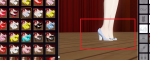
I'm fairly sure that's normal. Save the RV maid preset, load another random preset then reload the RV one again. If you installed everything as intructed then you should have COM3D2.EditBodyLoadFix and the correct body will automatically load and hopefully allignment will be correct. If not, it will load the default body and you have to switch manually. You should test the allignment in the actual game not just maid editor.Hello everyone
I am newbie and am using RV High Heels mod but getting this error. RV high heels shoe are partially lost when standing. Anyone know how to fix that?
View attachment 45387
OP
inlolzwetrust
Well-known member
- Joined
- May 3, 2018
- Messages
- 984
- Reputation score
- 531
[UPDATE] Translation pack was updated to support latest dlc and includes all the official translation from EN version to date.
[WARNING] The category change from update 2.23 has the potential to cause issues with some plugins. It needs some testing and user reports to confirm if it's safe or not.
[WARNING] The category change from update 2.23 has the potential to cause issues with some plugins. It needs some testing and user reports to confirm if it's safe or not.

Schneitzel
New member
- Joined
- Oct 5, 2020
- Messages
- 3
- Reputation score
- 0
Hello  would really appreciate if someone could help me.
I'm getting an error message when I start yotogi:


Don't know what to do :/
would really appreciate if someone could help me.I'm getting an error message when I start yotogi:
Don't know what to do :/
OP
inlolzwetrust
Well-known member
- Joined
- May 3, 2018
- Messages
- 984
- Reputation score
- 531
That screenshot is useless. Post COM3D2x64_Data/output_log.txtHello
I'm getting an error message when I start yotogi:
View attachment 45414View attachment 45415
Don't know what to do :/
1 When did the error start appearing ?
2 Was the game working fine when you installed it ?
3 Did you change anything lately?
4 Did you update the game?
5 Did you follow the instructions from the master guide ?
Schneitzel
New member
- Joined
- Oct 5, 2020
- Messages
- 3
- Reputation score
- 0
After talking to the girl at night and before room selection.That screenshot is useless. Post COM3D2x64_Data/output_log.txt
1 When did the error start appearing ?
2 Was the game working fine when you installed it ?
3 Did you change anything lately?
4 Did you update the game?
5 Did you follow the instructions from the master guide ?
It is my first install following the master guide I hope i didnt overlooked things but I tried to read it carefully. I updated to version 2.220. Thanks for the fast reply and sorry for posting useless screenshots :/
Attachments
OP
inlolzwetrust
Well-known member
- Joined
- May 3, 2018
- Messages
- 984
- Reputation score
- 531
The game appears to load without any plugin errors so the issue is with the base game itself. I see that you have most if not all dlc installed.After talking to the girl at night and before room selection.
It is my first install following the master guide I hope i didnt overlooked things but I tried to read it carefully. I updated to version 2.220. Thanks for the fast reply and sorry for posting useless screenshots :/
There is something in the update 2.23 changelog that translates to: "Fixed the problem that an error occurs when starting a night party if X1 is not installed in the 2.22.0 environment. "
I don't know if this applies to the error you are having because you seem to have X1 installed.
I'd suggest first updating to 2.23 and hope that the error gets resolved by itself.
Schneitzel
New member
- Joined
- Oct 5, 2020
- Messages
- 3
- Reputation score
- 0
worked with the new updateThe game appears to load without any plugin errors so the issue is with the base game itself. I see that you have most if not all dlc installed.
There is something in the update 2.23 changelog that translates to: "Fixed the problem that an error occurs when starting a night party if X1 is not installed in the 2.22.0 environment. "
I don't know if this applies to the error you are having because you seem to have X1 installed.
I'd suggest first updating to 2.23 and hope that the error gets resolved by itself.
thanks for helping outFirst time setup: I've carefully followed the master guide twice, running into exactly the same issue both times even after a complete reinstall. I have a few errors that get thrown on boot, and am able to start a new game just fine but get this error when trying to load a save:
Object reference not set to an instance of an object
at CharacterMgr.Deserialize (System.IO.BinaryReader) <0x0060d>
at (wrapper dynamic-method) GameMain.DMD<GameMain..Deserialize>
(GameMain,int,bool) <0x01295>
When in maid customization I've also noticed that several modded hairs don't have textures and if a clothing item has color options they only display the default color.
As you can see from the attached log, it also spams this error repeatedly:
NullReferenceException: Object reference not set to an instance of an object
at COM3D2.HighHeel.Plugin.OnGUI () [0x00000] in <filename unknown>:0
NullReferenceException: Object reference not set to an instance of an object
at COM3D2.HighHeel.Plugin.Update () [0x00000] in <filename unknown>:0
Am I doing something wrong in my understanding of the instructions in the guide? Any insight in how this might be fixed?
Object reference not set to an instance of an object
at CharacterMgr.Deserialize (System.IO.BinaryReader) <0x0060d>
at (wrapper dynamic-method) GameMain.DMD<GameMain..Deserialize>
(GameMain,int,bool) <0x01295>
When in maid customization I've also noticed that several modded hairs don't have textures and if a clothing item has color options they only display the default color.
As you can see from the attached log, it also spams this error repeatedly:
NullReferenceException: Object reference not set to an instance of an object
at COM3D2.HighHeel.Plugin.OnGUI () [0x00000] in <filename unknown>:0
NullReferenceException: Object reference not set to an instance of an object
at COM3D2.HighHeel.Plugin.Update () [0x00000] in <filename unknown>:0
Am I doing something wrong in my understanding of the instructions in the guide? Any insight in how this might be fixed?
Attachments
OP
inlolzwetrust
Well-known member
- Joined
- May 3, 2018
- Messages
- 984
- Reputation score
- 531
My first guess is that you have plugins incompatible with version 3.xx. The guide is for version 2.xx branch only. If you want to play on 3.xx you shouldn't install the CMI difference module (as mentioned in the guide). I know that you installed it because HighHeel plugin is not part of CMI. I recommend that you update the game to 3.23.0 then reinstall CMI and leave it as is. And restore the i18nEx translation from the backup folderFirst time setup: I've carefully followed the master guide twice, running into exactly the same issue both times even after a complete reinstall. I have a few errors that get thrown on boot, and am able to start a new game just fine but get this error when trying to load a save:
Object reference not set to an instance of an object
at CharacterMgr.Deserialize (System.IO.BinaryReader) <0x0060d>
at (wrapper dynamic-method) GameMain.DMD<GameMain..Deserialize>
(GameMain,int,bool) <0x01295>
When in maid customization I've also noticed that several modded hairs don't have textures and if a clothing item has color options they only display the default color.
As you can see from the attached log, it also spams this error repeatedly:
NullReferenceException: Object reference not set to an instance of an object
at COM3D2.HighHeel.Plugin.OnGUI () [0x00000] in <filename unknown>:0
NullReferenceException: Object reference not set to an instance of an object
at COM3D2.HighHeel.Plugin.Update () [0x00000] in <filename unknown>:0
Am I doing something wrong in my understanding of the instructions in the guide? Any insight in how this might be fixed?
rin tashiro
New member
- Joined
- Apr 30, 2022
- Messages
- 23
- Reputation score
- 0
I have this issue since I have updated my game to 2.16, and it's still happening when I updated to 2.23. It's just that I put it on hold for a previous, separate issue:
- In Karaoke, I cannot select the songs or food. They both only play the first option.
- In the summer festival mini-game, I cannot aim at the targets by moving my mouse.
OP
inlolzwetrust
Well-known member
- Joined
- May 3, 2018
- Messages
- 984
- Reputation score
- 531
I know nothing about gameplay issues so this should be a question forI have this issue since I have updated my game to 2.16, and it's still happening when I updated to 2.23. It's just that I put it on hold for a previous, separate issue:
Also, for both scenes, the scene seem to move erratically when I press the arrow keys. Is there a configuration settings to fix these issues, or a guide I can look to?
- In Karaoke, I cannot select the songs or food. They both only play the first option.
- In the summer festival mini-game, I cannot aim at the targets by moving my mouse.
You must be registered to see the links
discord.I appreciate the followup! I had zero intention of updating to version 3.xx and have installed the update to 2.23. I did install the CMI difference module, but I'm curious how I could have gotten confused and updated to 3.xx branch when that was never my intention. Best way to downgrade back to 2.xx if the updater to 2.23 doesn't work?
Edit: I'm using the Custom Maid Ultimate - 2022 Edition version if that matters, and opted to do the install without changing my locality to Japanese (just using the provided emulators for the install).
Edit: I'm using the Custom Maid Ultimate - 2022 Edition version if that matters, and opted to do the install without changing my locality to Japanese (just using the provided emulators for the install).

SkyBoy
New member
- Joined
- Sep 17, 2022
- Messages
- 2
- Reputation score
- 0
Do not ask for a game for ANY reason. Asking for or alluding to links to game downloads is prohibited. Permanent ban.
there is no way someone give us link for this with all the steps and have the CM3D2 & COM3D2 linked and everything is good with mods
As the author mentions in the guide, that would be pointless as it would be outdated in a month and would not work properly with every setup. If you want to enjoy a modded game, you have to do the work (and READING!) but inlolzwetrust has made it very easy by providing a comprehensive guide, links, and even multiple options for the various steps. Take a few days, read it, and work through the process and it will be worth it. I've loved this game for years but am excited to finally get to a functional, comprehensive install.there is no way someone give us link for this with all the steps and have the CM3D2 & COM3D2 linked and everything is good with mods
OP
inlolzwetrust
Well-known member
- Joined
- May 3, 2018
- Messages
- 984
- Reputation score
- 531
I don't think you can safely downgrade from 3.xx to 2.xx by using a 2.xx updater. I remember that kiss released a migration tool that allowed you to upgrade to COM3D2.5 and at the same time make another copy downgraded to 1.55.5 in case you updated by accident.I appreciate the followup! I had zero intention of updating to version 3.xx and have installed the update to 2.23. I did install the CMI difference module, but I'm curious how I could have gotten confused and updated to 3.xx branch when that was never my intention. Best way to downgrade back to 2.xx if the updater to 2.23 doesn't work?
Edit: I'm using the Custom Maid Ultimate - 2022 Edition version if that matters, and opted to do the install without changing my locality to Japanese (just using the provided emulators for the install).
You must be registered to see the links
it is. I've never used it. You should translate the instructions.Thank you. I'm been able to get the game running with almost no issues (beyond hair textures and minimal log spamming):I don't think you can safely downgrade from 3.xx to 2.xx by using a 2.xx updater. I remember that kiss released a migration tool that allowed you to upgrade to COM3D2.5 and at the same time make another copy downgraded to 1.55.5 in case you updated by accident.
You must be registered to see the linksit is. I've never used it. You should translate the instructions.
[Error : Unity Log] TypeLoadException: Could not load type 'Slot'.
Stack trace:
CM3D2.PartsEdit.Plugin.BoneEdit.CommonDataChangeCheck ()
CM3D2.PartsEdit.Plugin.BoneEdit.Update ()
[Error : Unity Log] NullReferenceException: Object reference not set to an instance of an object
Stack trace:
COM3D2.YotogiUtil.Plugin.YotogiUtil.OnGUI ()
Stack trace:
CM3D2.PartsEdit.Plugin.BoneEdit.CommonDataChangeCheck ()
CM3D2.PartsEdit.Plugin.BoneEdit.Update ()
[Error : Unity Log] NullReferenceException: Object reference not set to an instance of an object
Stack trace:
COM3D2.YotogiUtil.Plugin.YotogiUtil.OnGUI ()
I'm sure something in my previous log gave you the indication that I had updated to 3.xx by mistake, but I'm curious if you could point you to what provided that impression? I'm not convinced that I did in fact update to the 3.xx branch since everything seems connected and working now despite that log spam and this single red issue in the log at boot:
[Error :SybarisLoader] System.Reflection.TargetInvocationException: Exception has been thrown by the target of an invocation. ---> Mono.Cecil.Inject.InjectionDefinitionException: The injection method has a wrong number of parameters! Check that the provided target method, local variables, member references and injection flags add up to the right number of parameters.
Needed parameters: Prefix: 1, Locals: 0, Members: 0, Parameters: between 1 and 6, TOTAL: between 2 and 7.
Injection has 8 parameters.
at Mono.Cecil.Inject.InjectionDefinition.Assert (Boolean val, System.String message) [0x00000] in <filename unknown>:0
at Mono.Cecil.Inject.InjectionDefinition.VerifyInjectionDefinition (Mono.Cecil.MethodDefinition injectMethod, Mono.Cecil.MethodDefinition injectTarget, InjectFlags flags, System.Int32[] localVarIDs, Mono.Cecil.FieldDefinition[] memberReferences) [0x00000] in <filename unknown>:0
at Mono.Cecil.Inject.InjectionDefinition..ctor (Mono.Cecil.MethodDefinition injectTarget, Mono.Cecil.MethodDefinition injectMethod, InjectFlags flags, System.Int32[] localVarIDs, Mono.Cecil.FieldDefinition[] memberReferences) [0x00000] in <filename unknown>:0
at Mono.Cecil.Inject.MethodDefinitionExtensions.InjectWith (Mono.Cecil.MethodDefinition method, Mono.Cecil.MethodDefinition injectionMethod, Int32 codeOffset, System.Object tag, InjectFlags flags, InjectDirection dir, System.Int32[] localsID, Mono.Cecil.FieldDefinition[] typeFields) [0x00000] in <filename unknown>:0
at COM3D2.FaceType.Patcher.FaceType.Patch (Mono.Cecil.AssemblyDefinition assembly) [0x00000] in <filename unknown>:0
at (wrapper managed-to-native) System.Reflection.MonoMethod:InternalInvoke (object,object[],System.Exception&)
at System.Reflection.MonoMethod.Invoke (System.Object obj, BindingFlags invokeAttr, System.Reflection.Binder binder, System.Object[] parameters, System.Globalization.CultureInfo culture) [0x00000] in <filename unknown>:0
--- End of inner exception stack trace ---
at System.Reflection.MonoMethod.Invoke (System.Object obj, BindingFlags invokeAttr, System.Reflection.Binder binder, System.Object[] parameters, System.Globalization.CultureInfo culture) [0x00000] in <filename unknown>:0
at System.Reflection.MethodBase.Invoke (System.Object obj, System.Object[] parameters) [0x00000] in <filename unknown>:0
at BepInEx.SybarisLoader.Patcher.Loader.Patch (Mono.Cecil.AssemblyDefinition assembly) [0x00000] in <filename unknown>:0
Needed parameters: Prefix: 1, Locals: 0, Members: 0, Parameters: between 1 and 6, TOTAL: between 2 and 7.
Injection has 8 parameters.
at Mono.Cecil.Inject.InjectionDefinition.Assert (Boolean val, System.String message) [0x00000] in <filename unknown>:0
at Mono.Cecil.Inject.InjectionDefinition.VerifyInjectionDefinition (Mono.Cecil.MethodDefinition injectMethod, Mono.Cecil.MethodDefinition injectTarget, InjectFlags flags, System.Int32[] localVarIDs, Mono.Cecil.FieldDefinition[] memberReferences) [0x00000] in <filename unknown>:0
at Mono.Cecil.Inject.InjectionDefinition..ctor (Mono.Cecil.MethodDefinition injectTarget, Mono.Cecil.MethodDefinition injectMethod, InjectFlags flags, System.Int32[] localVarIDs, Mono.Cecil.FieldDefinition[] memberReferences) [0x00000] in <filename unknown>:0
at Mono.Cecil.Inject.MethodDefinitionExtensions.InjectWith (Mono.Cecil.MethodDefinition method, Mono.Cecil.MethodDefinition injectionMethod, Int32 codeOffset, System.Object tag, InjectFlags flags, InjectDirection dir, System.Int32[] localsID, Mono.Cecil.FieldDefinition[] typeFields) [0x00000] in <filename unknown>:0
at COM3D2.FaceType.Patcher.FaceType.Patch (Mono.Cecil.AssemblyDefinition assembly) [0x00000] in <filename unknown>:0
at (wrapper managed-to-native) System.Reflection.MonoMethod:InternalInvoke (object,object[],System.Exception&)
at System.Reflection.MonoMethod.Invoke (System.Object obj, BindingFlags invokeAttr, System.Reflection.Binder binder, System.Object[] parameters, System.Globalization.CultureInfo culture) [0x00000] in <filename unknown>:0
--- End of inner exception stack trace ---
at System.Reflection.MonoMethod.Invoke (System.Object obj, BindingFlags invokeAttr, System.Reflection.Binder binder, System.Object[] parameters, System.Globalization.CultureInfo culture) [0x00000] in <filename unknown>:0
at System.Reflection.MethodBase.Invoke (System.Object obj, System.Object[] parameters) [0x00000] in <filename unknown>:0
at BepInEx.SybarisLoader.Patcher.Loader.Patch (Mono.Cecil.AssemblyDefinition assembly) [0x00000] in <filename unknown>:0
OP
inlolzwetrust
Well-known member
- Joined
- May 3, 2018
- Messages
- 984
- Reputation score
- 531
That was answered in the FAQ in the master guide.How to get xray mode, as on 3 and 5 screenshots? Many attempts have led to nothing
Line 448 and 632 from your log tells the game version 3.16. Before that I saw COM3D2.5.GearMenuFix.Patch.dll which is installed by CMI only on version 3.xx.Thank you. I'm been able to get the game running with almost no issues (beyond hair textures and minimal log spamming):
I'm sure something in my previous log gave you the indication that I had updated to 3.xx by mistake, but I'm curious if you could point you to what provided that impression? I'm not convinced that I did in fact update to the 3.xx branch since everything seems connected and working now despite that log spam and this single red issue in the log at boot:
You shouldn't have any errors though, no matter which version you are on.
Modded hairs rarely have color textures. You are supposed to only use free color.
If you are still running on 3.16 then I sugest updating to 3.23 and then see what errors you get. You should report them on CustomMaid discord if you want them fixed.
Last edited:
Share: