What's new

ACT Shota [ Maruru Software ] Shrine Maiden Kanna's Meatheaded ExorFist Record / 巫女カンナ脳筋退魔記 (RJ304454) ( RJ200725)


Since Harleyquin13 and super_slicer went through the trouble of rescuing this thread from the shadow realm, I'll add that it now has an official English version and title on DLsite -

Shrine Maiden Kanna's Meatheaded ExorFist Record

English version has a new RJ # - RJ304454.

Though I could swear a thread reflecting that title once existed? Some Universe B shit maybe.

Edit: Removed link to store page because I'm not the OP and I just noticed the shota tag.
 
Since Harleyquin13 and super_slicer went through the trouble of rescuing this thread from the shadow realm, I'll add that it now has an official English version and title on DLsite -

Shrine Maiden Kanna's Meatheaded ExorFist Record

English version has a new RJ # - RJ304454.

Though I could swear a thread reflecting that title once existed? Some Universe B shit maybe.

Edit: Removed link to store page because I'm not the OP and I just noticed the shota tag.

And there's a sequel out. Will create a thread for that if I have time, hopefully without seeing it get randomly deleted from the forum for no good reason.
 
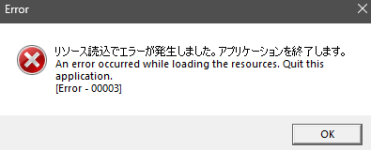
Hello, everyone, can somebody help me out? I'm stuck with this problem and can't find any solution on the internet

1772524630740.png
 
Anyone got any suggestions on fixing the resolution? I tried using the F4 key to make it full screen like the controls in the readme suggested, and it just flickered a bit and crashed, but now when I open it, it's even smaller than it was before somehow.
 
Anyone got any suggestions on fixing the resolution? I tried using the F4 key to make it full screen like the controls in the readme suggested, and it just flickered a bit and crashed, but now when I open it, it's even smaller than it was before somehow.
You could try alt+enter, usually works for me on games.
 
You could try alt+enter, usually works for me on games.

Thanks for the suggestion, it slipped my mind completely to try that given I was looking at instructions saying press F4 for full screen. It didn't work, but it also didn't crash it. I think it rebound that functionality entirely. I'll just put up with tiny screen I guess. I can use the in game zoom functionality to get things somewhat reasonably sized.
 
Anyone got any suggestions on fixing the resolution? I tried using the F4 key to make it full screen like the controls in the readme suggested, and it just flickered a bit and crashed, but now when I open it, it's even smaller than it was before somehow.
try using borderless gaming or LosslessScaling
actually hold on, what is the issue even? what's there to fix?
 
The issue was that full screen didn't work. Did the black screen, flicker, crash back to normal desktop, except when I went to launch it again, I'm pretty sure the resolution was somehow even smaller than it was before I tried to go full screen. It's entirely possible it's just my own mind playing tricks on me, but I've given up at this point, and am just accepting that it's small. It is what it is.
 
Back
Top