What's new

RPG RPG Maker Loli [Tsukinomizu Project] 苗床デモンズグラウンド ~奈落の孕姫~ / Naedoko Demon's Ground (RJ165659 / RE165659)


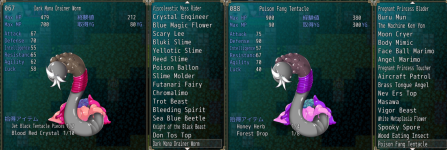
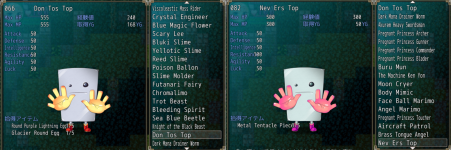
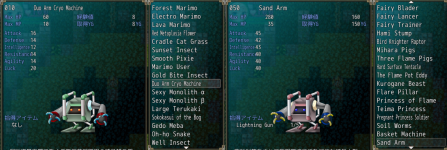
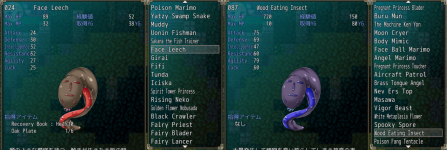
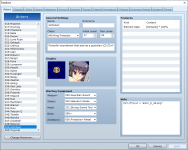
Gummiel I was wondering if you could see a good picture for Sand Arm, Nev Ers Top, Wood Eating Insect and/or Poison Fang Tentacle in the editor? OR tell me how I could view it without actually playing the game? Because I'm trying to use actual pictures without taking screenshots for this part of the guide.
 
Last edited:
Gummiel I was wondering if you could see a good picture for Sand Arm, Nev Ers Top, Wood Eating Insect and/or Poison Fang Tentacle in the editor? OR tell me how I could view it without actually playing the game? Because I'm trying to use actual pictures without taking screenshots for this part of the guide.
Well for viewing it yourself, all the pictures for the game are in the /graphics folder of the game in png format(for enemies like those you mentioned the subfolder /battlers would be the one to look in), for that alone(which would probably be better quality and resolution than a Screenshot I might give of the editor entry).

Also the editor is currently on sale on humble bundle for about €5 (all the RPGM editors does go on deep(the older the version the deeper the discount) semi-frequest sales on both steam and humble, WAY overpriced to buy them at full price).
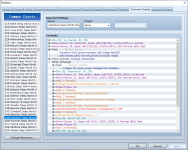
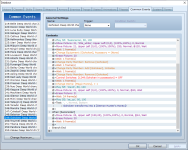
To actually open the game in the editor, if you get it, you will need to first create a new empty project (you can delete it after again if you want). Once you have that new project go into its folder and find the Game.rvproj2 file, and copy that over ro the Naedoko Demons ground folder (the base folder where the game.exe is located) and that will be the "entry" point the editor uses to open the game. It is that easy yes to open a RPGM game in the respective editor (ofc game and editor version have to match or things will not work properly). Keep in mind if you do that as well, that even the translated game still have a LOT of internal names in japanese, like map names and such, that are not shown to the player. The only reason they have been in English in my Screenshot is due to the things I been doing with the game and how often I used it I went ahead and manually translated those myself at some point to make it easier to navigate it
 
i spent some time scrolling through the post history but i can't fine the post on how to get all the outfits how do i get the angel one again? ive beat the game and am doing post-game clean up
 
i spent some time scrolling through the post history but i can't fine the post on how to get all the outfits how do i get the angel one again? ive beat the game and am doing post-game clean up
One of the Side Rooms in the "1st prison" in the Knights HQ. Be sure to bring Troymel with you
 
Well for viewing it yourself, all the pictures for the game are in the /graphics folder of the game in png format(for enemies like those you mentioned the subfolder /battlers would be the one to look in), for that alone(which would probably be better quality and resolution than a Screenshot I might give of the editor entry).

Also the editor is currently on sale on humble bundle for about €5 (all the RPGM editors does go on deep(the older the version the deeper the discount) semi-frequest sales on both steam and humble, WAY overpriced to buy them at full price).
To actually open the game in the editor, if you get it, you will need to first create a new empty project (you can delete it after again if you want). Once you have that new project go into its folder and find the Game.rvproj2 file, and copy that over ro the Naedoko Demons ground folder (the base folder where the game.exe is located) and that will be the "entry" point the editor uses to open the game. It is that easy yes to open a RPGM game in the respective editor (ofc game and editor version have to match or things will not work properly). Keep in mind if you do that as well, that even the translated game still have a LOT of internal names in japanese, like map names and such, that are not shown to the player. The only reason they have been in English in my Screenshot is due to the things I been doing with the game and how often I used it I went ahead and manually translated those myself at some point to make it easier to navigate it
Actually I have figured out that MOST of the pictures can be found in the folder in graphics in another folder named battlers.... UNFORTUATELY Sand Arm, Nev Ers Top, Wood Eating Insect and Poison Fang Tentacle are all missing from that folder... I'm still figuring out which monsters are missing.... THOUGH the Enemies wiki was able to save me from a few of the missing monsters.... Unfortunately they don't have ALL of the monsters pictures... there since it shows so many missing.... Unless I'm somehow missing them.....
 
Last edited:
Actually I have figured out that MOST of the pictures can be found in the folder in graphics in another folder named battlers.... UNFORTUATELY Sand Arm, Nev Ers Top, Wood Eating Insect and Poison Fang Tentacle are all missing from that folder... I'm still figuring out which monsters are missing.... THOUGH the Enemies wiki was able to save me from a few of the missing monsters.... Unfortunately they don't have ALL of the monsters pictures... there since it shows so many missing.... Unless I'm somehow missing them.....
That is the folder I said ;)

And they are absolutely there
Sand Arm: dg_a_010.png
Nev Ers Top: dg_a_062.png
Wood Eating Insect: dg_a_025.png
Poison Fang Tentacle: dg_a_064.png
 
That is the folder I said ;)

And they are absolutely there
Sand Arm: dg_a_010.png
Nev Ers Top: dg_a_062.png
Wood Eating Insect: dg_a_025.png
Poison Fang Tentacle: dg_a_064.png
Those ARE for the one's that I already have. The ones I'm looking for are the 2nd half of each picture.
 

Attachments

  • Dark Mana Drainer Worm and Poison Fang Tentacle.png
    Dark Mana Drainer Worm and Poison Fang Tentacle.png
    1.4 MB · Views: 2
  • Don Tos Top and Nev Ers Top.png
    Don Tos Top and Nev Ers Top.png
    1.4 MB · Views: 2
  • Duo Arm Cryo Machine and Sand Arm.png
    Duo Arm Cryo Machine and Sand Arm.png
    1.2 MB · Views: 1
  • Face Leech and Wood Eatng Insect.png
    Face Leech and Wood Eatng Insect.png
    1.2 MB · Views: 2
Those ARE for the one's that I already have. The ones I'm looking for are the 2nd half of each picture.
Ohh, I didn't notice that before now, but well those ARE the images used for those... except shown with a Hue change (different value for each, and the editor, only shows it as a slider, not the actual value). So all I can say is they are all somewhere above halfway
 
Back
Top