What's new

Character Aggressor Male Shana's renovated cave of weird sh-


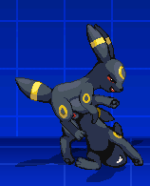
Probably no one will answer me, but how do I stop it from looking like this? I tried in Mugen and Ikemen, but nothing works. When the animation ends, the victim Umbreon falls. Does anyone else have this problem and if they found a solution?
Seems like someone answered you.

This depends on you and your collections of character. Either:
1. Fix Humpreon animation alignments
or
2. Fix the victim alignment.

In case you asked "What alignment"
The Y access position. Negative number goes up, positive number goes down
 
Seems like someone answered you.

This depends on you and your collections of character. Either:
1. Fix Humpreon animation alignments
or
2. Fix the victim alignment.

In case you asked "What alignment"
The Y access position. Negative number goes up, positive number goes down
I'm not sure where that would be, but let me clarify my problem. When the special jump attack animation starts (the one done with down left and X), it looks fine, but when control is regained, the female Umbreon drops, as if she's falling. The Umbreon victim is from here:
 

Attachments

  • Captura de pantalla 2026-02-20 073145.png
    Captura de pantalla 2026-02-20 073145.png
    6 KB · Views: 4
I'm not sure where that would be, but let me clarify my problem. When the special jump attack animation starts (the one done with down left and X), it looks fine, but when control is regained, the female Umbreon drops, as if she's falling. The Umbreon victim is from here:
You will find the animation inside Humpreon ".air" file
look through all the animation until you find it or click: "ctrl+d" before you perform the move. You will see white small texts on your left side of the screen.
Focus on the word "anim".
It will tell you exactly the number of his animation or the victim if you click it multiple times.
From there, you can move his sprites lower or move the victim sprite higher.

Keep in mind, you either do one, or the other, ( Attacker or Victim/Target ) NOT both. Doing both will throw off the alignments.

"Which one should I do?"
All depends on you.

If the issues is only for one character? Edit the Victim Sprite ( victim.sff )

"The Issues is happening to all characters?" Edit The Attacker ( Humpreon.air )
 
Encontrarás la animación dentro del archivo ".air" de Humpreon
Revisa toda la animación hasta encontrarla o haz clic en "Ctrl+D" antes de realizar el movimiento. Verás pequeños textos blancos a la izquierda de la pantalla.
Centrarse en la palabra "anim".
Te dirá exactamente el número de su animación o de la víctima si haces clic en él varias veces.
Desde allí, puedes mover sus sprites hacia abajo o mover el sprite de la víctima hacia arriba.

Ten en cuenta que debes hacer una cosa o la otra (Atacante o Víctima/Objetivo), NO ambas. Hacer ambas alterará las alineaciones.

¿Cuál debería hacer?
Todo depende de ti.

¿Si el problema solo afecta a un personaje? Edita el sprite de la víctima (victim.sff).

"¿Qué les pasa a todos los personajes?" Editar El Atacante (Humpreon.air)
Sí, solo afecta a la víctima; los demás personajes no caen así. Gracias por la ayuda; ahora sé qué hacer.
 
Back
Top