I actually found out the issue. I'm gonna post pictures of my problem and the solution incase anyone else comes by.
There are multiple settings for Japanese locale in Windows 10, only one of them affects files with non unicode characters. These below wont do anything
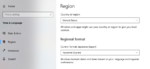
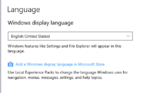
Instead of the settings above
You must change these settings here. You can leave your settings alone for your region and the like. BUt Windows must be told to set NON UNICODE characters to Japanese. Otherwise you won't extract the files properly. 7Zip is able to to this just fine when this setting is ticked.
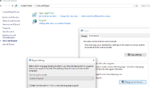
Thanks for the help from the above users.
There are multiple settings for Japanese locale in Windows 10, only one of them affects files with non unicode characters. These below wont do anything
Instead of the settings above
You must change these settings here. You can leave your settings alone for your region and the like. BUt Windows must be told to set NON UNICODE characters to Japanese. Otherwise you won't extract the files properly. 7Zip is able to to this just fine when this setting is ticked.
This sounds very cheeky, but my experience has been that 7Zip is not an ideal extractor for eroge games. and have had problems using it while doing everything else right.
WinRAR from my experience is more reliable and is preferable for data extraction. However I can't confirm or deny it would solve your problem.
Also I can't view your images like the above user experienced.
It is more likely the error is due to what the above user suggested, make sure though the language is set to Japanese for non-unicode programs.
Thanks for the help from the above users.


